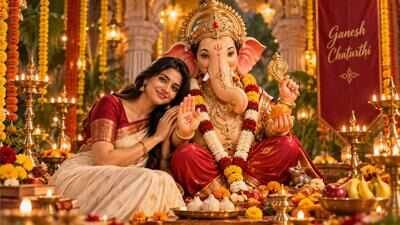
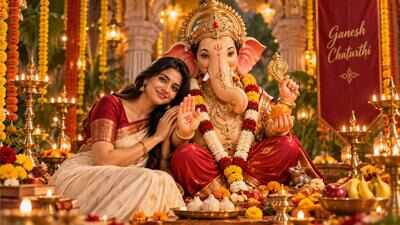
Want to create a special photo with Lord Ganesha this Ganesh Chaturthi? AI image tools like OpenAI’s ChatGPT and Google Gemini can turn a regular picture into a festive portrait featuring Lord Ganesha, flowers, diyas and traditional decorations. With the right prompt, you can also change the mood, clothes, lighting and background while asking the AI tool to keep your face and natural appearance unchanged. Here are five simple AI prompts you can try with your photo to create different Ganesh Chaturthi-themed images. The prompts can be used with AI image-generation or editing tools after uploading a clear photo.
How to create your AI photo with Lord Ganesha
Start by uploading a clear, well-lit photo to your preferred AI image-generation or editing tool. Then copy and paste one of the prompts below.For better results, tell the AI to preserve your exact facial features, skin texture and identity. You can also change the outfit, background and lighting based on the look you want.
1. Lord Ganesha blessing you
If you want a traditional devotional picture with Lord Ganesha beside you, try this prompt:Prompt:“Transform my photo into a beautiful devotional portrait with Lord Ganesha standing beside me and blessing me with his raised hand. Add traditional flowers, glowing diyas and an elegant festive backdrop. Keep my face, facial features and natural appearance unchanged and realistic. Use warm golden lighting, realistic photography and intricate details. No text.”
2. Grand Ganpati celebration
For a more colourful and festive image, use this prompt:Prompt:“Transform my photo into a grand Ganesh Chaturthi celebration featuring a beautifully decorated Lord Ganesha idol beside me. Add marigold flowers, diyas, traditional decorations and soft festive lights. Keep my exact facial features and expression realistic and recognisable. Create a cinematic, vibrant and photorealistic festive atmosphere. No text.”
3. Traditional Lord Ganesha portrait
If you want a more elegant Indian portrait, try this prompt:Prompt:“Turn my photo into an elegant traditional Indian portrait with Lord Ganesha beside me. Add a beautiful festive backdrop with flowers, diyas and subtle golden decorations. Dress me in elegant traditional Indian attire while keeping my face realistic and recognisable. Use soft golden lighting, natural skin texture and a premium photographic look. No text.”You can also replace “traditional Indian attire” with a specific outfit such as a saree, lehenga or kurta if you want more control over the final image.
4. Divine golden glow
For a softer and more peaceful Bappa photo, use this prompt:Prompt:“Transform my photo into a serene devotional scene with Lord Ganesha beside me, surrounded by flowers and glowing diyas. Add a subtle divine golden glow and a peaceful temple-inspired background. Preserve my exact facial features, hairstyle and natural appearance. Make the image photorealistic, elegant and detailed, with soft cinematic lighting. No text.”
5. Dreamy Ganpati festival look
For a more cinematic festive picture, try this:Prompt:“Transform my photo into a dreamy Ganpati festival portrait with Lord Ganesha beside me. Add colourful flowers, traditional decorations, glowing diyas and a beautiful evening festive atmosphere. Keep my face and identity unchanged and realistic. Use cinematic photography, warm lighting, natural proportions and highly detailed textures. Create a joyful yet devotional mood. No text.”
How to stop AI from changing your face
One common problem with AI photo editing is that the final image may not look exactly like the original person. To reduce this, add instructions such as:“Preserve my exact facial features and identity.” You can also say: “Do not alter my face or facial structure.”